





In this article A fake $750 Apple Cash offer funnels users toward app and game promotions Its device checks, countdown, and “spots left” claims aren’t real Users get no reward and may share information or spend money in games A page we found promises a $750 Apple Cash reward if you complete a quick “device […]
In this article
- A fake $750 Apple Cash offer funnels users toward app and game promotions
- Its device checks, countdown, and “spots left” claims aren’t real
- Users get no reward and may share information or spend money in games
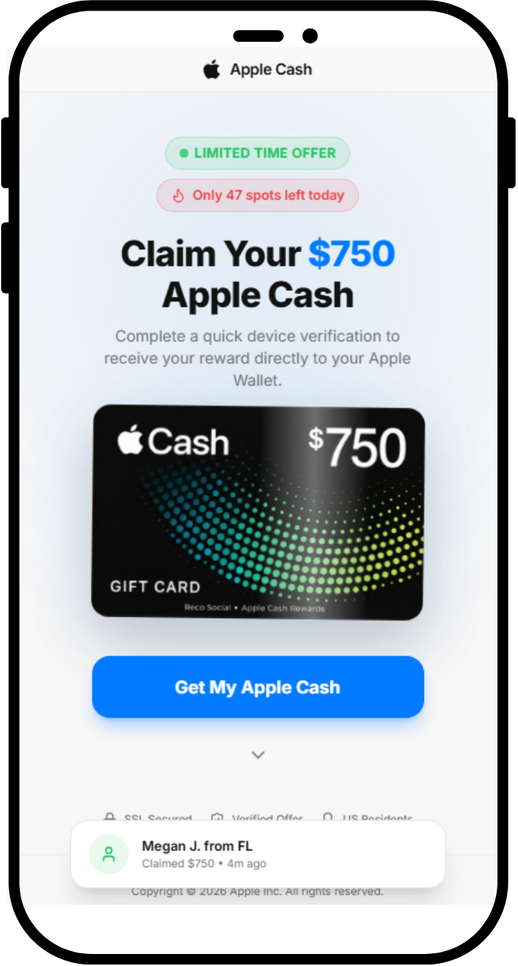
A page we found promises a $750 Apple Cash reward if you complete a quick “device verification.” There is no reward, and the page does not verify your device. Instead, it sends you to app offers through affiliate tracking links.
The page is not affiliated with Apple. If you’ve landed on a page like this, close it.
Why Apple makes such good bait
Apple is one of the world’s most recognized brands, and scammers use that familiarity to make fake offers seem credible. Apple’s own scam guidance lists fake promotions offering free products and prizes among common tricks.
Current Apple news gives scammers useful cover. The new iPhone Duo is in the headlines, and we recently found a fake preorder page whose code tried to exploit older iPhones as soon as the page opened. With the iPhone Duo starting at $1,999, a promise of $750 in Apple money may catch people’s attention.
The word “verify” may also sound timely. Starting November 9, Green Dot Bank, which issues Apple Cash, will require some users to verify their identity before they can reload their balance. A fake page asking people to “verify your device” to get Apple Cash may seem more plausible in that context.
Apple Cash isn’t an Apple Gift Card
The page blurs two different things:
- Apple Cash is money you send, receive and spend through Apple Wallet.
- An Apple Gift Card adds money to your Apple Account balance for Apple purchases.
Apple warns that its gift cards can only be used for Apple purchases, and that someone asking you to pay them with one is probably a scammer. But neither Apple Cash nor an Apple Gift Card comes from a website that “unlocks” it after you install an app.
The fake site leans hard on Apple’s name. It calls the app it promotes an “Official Apple Partner” that is “Verified by Apple Cash,” and its footer claims “Copyright © 2026 Apple Inc.” None of that is true.
A “verification” that verifies nothing
We looked at the code behind the page’s three steps: Eligibility Check, Verify Device and Claim Reward.
The eligibility check is a timer. The four items that tick green, including “Location: United States,” are just labels that light up on a schedule. The page never checks where you are or what device you use. Everyone passes in under four seconds.
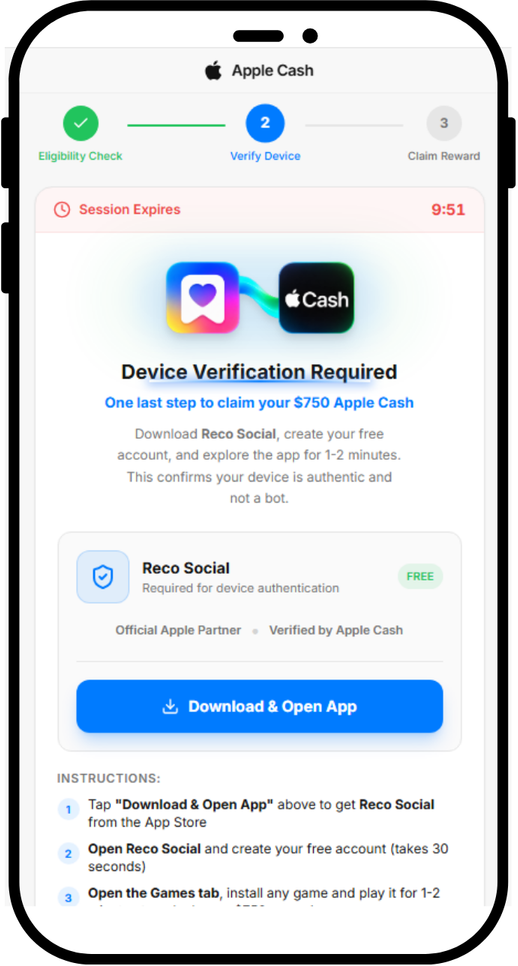
The device verification is an app install. The page tell users to download an app called Reco Social, then tells them to create an account, and install and play a game. We found no evidence that Reco Social or its developer created or operated the fake reward page.
When you tap Download & Open App, the page opens a link in a new tab. Five seconds later, it starts showing “Verifying device…”. Nothing is being verified. The page has no way of knowing whether you installed anything, created an account or played a game.
The reward is the same link again. Ten minutes after you tap the button, the page moves on by itself and announces “Device Verified Successfully,” whether or not you installed anything. The Claim Your $750 button doesn’t add anything to your wallet. It opens the same link as the download button.
Fake urgency
The page is built to stop you from thinking too long:
- “Only 47 spots left today” always starts at 47. It drops by one every 30 seconds and stops at 3, so it never runs out.
- The “claimed $750” pop-ups are generated at random from a list of 15 first names and 15 US states, with a random “minutes ago.” Every visitor sees a new one every 8 to 15 seconds.
- The 10-minute “Session Expires” countdown doesn’t end anything when it hits zero.
Who gets paid?
The download button doesn’t go directly to the App Store. It first goes through a tracking link on taprkr[.]com. These links can be used in affiliate marketing to credit clicks and installs to whoever sent the traffic.
The link carries a label, “recosocial-cpr.” CPR can stand for “cost per registration,” a deal where a promoter earns money when someone signs up. That label alone doesn’t confirm how this offer pays.
The destination varied in our tests. The link led to an offer labeled “playful-rewards-revshare” on iPhone and an ad network on PC. A revshare (revenue share) deal usually pays the promoter a cut of what users later spend, such as on in-app purchases.
The tracking labels suggest that promoters may earn money from registrations or spending in promoted apps, but they don’t confirm how this offer pays. Users don’t receive the promised $750.
We have no evidence that Reco Social or any app at the end of these links is behind the fake Apple page. Deceptive affiliate promoters can send traffic to legitimate apps because they may earn money for installs or signups regardless of how users were persuaded.
The page also loads a TikTok tracking pixel, which advertisers use to measure campaigns. This could mean the operators are measuring traffic from TikTok, but it doesn’t show where the link was shared.
What’s the harm if it’s “just” an app install?
Compared to a page that steals passwords or card numbers, this one can look harmless. But you still pay a price:
- You give away personal data. Creating an account means handing over your email address, phone number or social login to a service you only signed up for because of a lie.
- You may be encouraged to spend. Many mobile games make their money from in-app purchases, and with a revenue-share deal, someone profits when you spend.
- You may be set up for the next scam. Fake reward offers often come in chains. The next one may ask for your Apple Account details, card number, or a “small processing fee.”
- You lose time chasing a reward that was never coming.
How to stay safe
Keep these points in mind if you come across an Apple Cash or other Apple-related offer online:
- Don’t expect an app install to pay you in Apple Cash. Be suspicious of any “Apple” offer that asks you to download a third-party app, create an account or play a game to receive Apple Cash or an Apple Gift Card.
- Verify Apple Cash only in Settings. The real identity check is in Settings > Wallet & Apple Pay > Apple Cash. Treat any website or message that asks you to “verify” Apple Cash somewhere else as suspicious.
- Be extra careful around launches and holidays. iPhone Duo deals, giveaways and preorder offers will keep circulating. Go to apple.com or the Apple Store app yourself instead of following links.
- Check the address bar. Apple’s website is apple.com. A page on a domain like applecashgiftcard[.]com is not Apple, however much it looks like it.
- Treat countdowns and “spots left” as red flags. Fake urgency is there to rush you past the moment you’d ask, “Why would anyone give me $750 for this?”
- Already installed an app from a page like this? You didn’t earn a reward, so you can delete the app. Delete any account you created through it, cancel any subscriptions in your App Store settings, and change that password on any other accounts where you reused it.
- Never pay with gift cards, and never pay to receive a prize. As the FTC puts it, “No real business or government agency will ever tell you to buy a gift card to pay them.” If a “reward” asks for a fee, your card details or gift card codes, it’s a scam.
- Report it. Apple asks people to forward suspicious Apple-themed messages to reportphishing@apple.com. You can also report the ad or post to the platform where you saw it and, in the US, report fraud at ReportFraud.ftc.gov.
How Malwarebytes helps
Malwarebytes can help block known scam pages. Use Browser Guard with a supported browser, or Web Protection in Malwarebytes for iOS when browsing with Safari.
If you’re not sure whether a link, text or offer is real, you can ask Malwarebytes Scam Guard before you click.

“One of the best cybersecurity suites on the planet.”
According to CNET. Read their review →
About the author


Sr. Malware Research Engineer/Web Protection Technical Lead, ThreatLabs
Passionate about antivirus solutions, Stefan has been involved in malware testing and AV product QA from an early age. As part of the Malwarebytes team, Stefan is dedicated to protecting customers and ensuring their security.


