





TapMap is a free, open-source desktop app that plots a computer’s active network connections on an interactive world map. It scans open sockets, pulls out the remote IP addresses and looks each one up in a local GeoIP database. Then it draws the result in the browser, with the application behind each connection a click […]
TapMap is a free, open-source desktop app that plots a computer’s active network connections on an interactive world map. It scans open sockets, pulls out the remote IP addresses and looks each one up in a local GeoIP database. Then it draws the result in the browser, with the application behind each connection a click away.
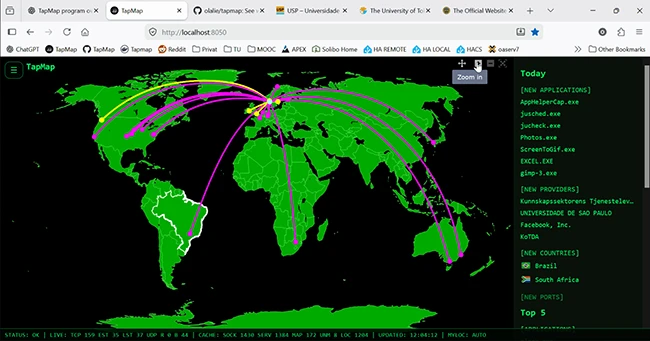
“Locations are based on IP geolocation data and are approximate. TapMap does not independently determine or verify the physical location of the network endpoint,” Ola Lie, the developer of TapMap, told Help Net Security. “For some network infrastructure, including anycast services, CDNs, proxies, and VPNs, the displayed location may differ from the physical location of the endpoint handling the connection.”
The labels need a similar caveat. TapMap groups connections by ASN (autonomous system number), the number that identifies a network on the internet. “ASN and ASN organization identify the network operator, not necessarily the service owner,” Lie said.
No warning flags yet
Some GeoIP databases attach a radius to each result, which estimates how far off the pin might be. “I’ve been looking into possible improvements, including GeoIP accuracy-radius data and independent anycast measurements. One finding is that a small reported accuracy radius does not necessarily mean a location is reliable, particularly for anycast addresses,” Lie said.
“I’m considering making geolocation uncertainty more visible in the interface and possibly identifying known anycast addresses,” he said. “However, reliable classification and incomplete coverage remain challenges, so I wouldn’t want to introduce indicators that could be misleading themselves.”
If you use TapMap, the application name is the most reliable part of each entry, because it comes from your own operating system. Treat the location as a starting point.
Alerts wait out a learning period
TapMap keeps a running log of up to 500 recent events it calls Significant Connections. “TapMap already supports desktop and MQTT notifications for Significant Connections, such as new applications, countries, network providers, ports, and failed application verification,” Lie said. Desktop alerts are on by default on Windows, Linux and macOS. The second channel publishes events to a message broker so another system can collect them.
“Significant Connections are recorded from the beginning, but notifications are delayed until a learning period has passed (7 active Insights days by default). This helps avoid excessive notifications during initial use,” Lie said. The count is in active days, so a machine that is often switched off will take longer to finish the learning period.
“TapMap continues monitoring in the background even when the browser tab is closed, so users can receive notifications without keeping the interface open. On desktop installations, automatic startup at login is also available and can be enabled or disabled,” he said.
TapMap is available for free on GitHub.

Must read:
- 20 open-source cybersecurity tools to keep your team ready for anything
- GitHub CISO on security strategy and collaborating with the open-source community

Subscribe to the Help Net Security ad-free monthly newsletter to stay informed on the essential open-source cybersecurity tools. Subscribe here!