




Signal, the encrypted messaging app, is restricting AI assistants built into mobile operating systems from capturing the content of users’ conversations. The protections target Siri AI on iOS 27 and AI assistants on supported Android devices, including Google’s Gemini. These assistants can read the phone’s screen to answer questions and carry out tasks. According to […]
Signal, the encrypted messaging app, is restricting AI assistants built into mobile operating systems from capturing the content of users’ conversations. The protections target Siri AI on iOS 27 and AI assistants on supported Android devices, including Google’s Gemini.
These assistants can read the phone’s screen to answer questions and carry out tasks. According to Signal, the process can capture message text and make it accessible to a local database or remote server used by the assistant. This takes the data outside Signal’s control and puts the privacy of every participant in a conversation at risk.
“We all need to recognize that the current integration of AI agents into the operating system, without these common-sense remedies, represents an existential threat to privacy at the application layer, and the ability of independent developers like Signal to protect your sensitive data,” Meredith Whittaker, President of Signal, wrote.
How the protections work
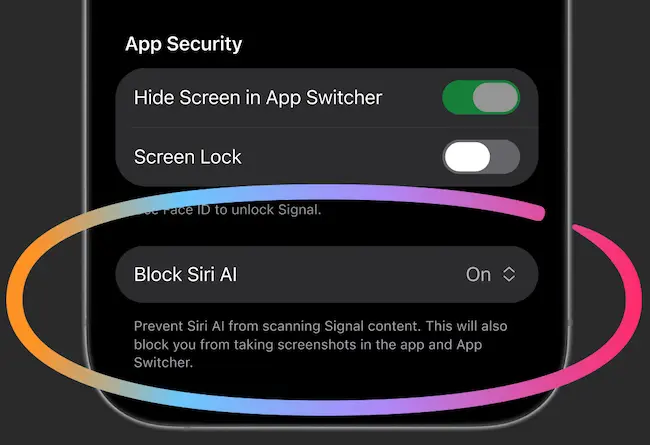
On iOS 27, Signal blocks screenshots inside the app to prevent Siri AI from capturing message content through screen reading. A new “Block Siri AI” setting controls the feature.
On Android, the app detects when an AI assistant attempts to read the screen and automatically enables its “Screen security” setting. Many Android vendors provide no reliable way to detect screenshot attempts once screenshots are disabled, so Signal designed its protection around detecting AI assistants instead.
I tested the feature by taking a screenshot inside the app. The resulting image showed the Signal logo centered on a white background, with no message content visible.

Users who want to take screenshots can disable the protection in settings. Signal warns that doing so may expose their messages and those of their contacts to AI assistants.
Signal acknowledges that the protections have limitations. An AI agent could still retrieve content stored on the device through the filesystem. On macOS, Signal cannot reliably block screenshots because Apple does not provide the documented tools it needs, leaving Mac users without the same protection. The company recommends that macOS 27 users add Signal to the Excluded Apps list under System Settings > Siri to protect message content from proactive access by Siri AI.
Signal previously took a similar step against Microsoft’s Recall feature on Windows 11. Recall captures screenshots every few seconds and uses optical character recognition to extract text into a searchable on-device database, potentially retaining content from disappearing messages.
What Signal wants from the platforms
Signal is asking Apple, Google and Microsoft to provide a documented way for apps to opt out of AI access to screen content, files, notifications and APIs without compromising their core functionality. It also wants clearer technical documentation explaining how AI agents access and process data. Signal’s developers spent months investigating Android and iOS to understand what happens to app data because public documentation is lacking.
Signal argues that confidential computing does not fully address the concern because platform providers still decide which privacy guarantees to offer. The company also wants tools to restrict third-party agents such as Meta’s Muse, which can access app data through accessibility permissions granted by users during setup.